

LifeClock (Part 2/2): Refactoring to Clean Architecture#
Six months after completing my CS50 LifeClock project, I wanted to add milestones to my poster. Then I wanted a web interface. Then themes. Each change meant hunting through tangled code, breaking tests, and asking: “Why is birthday logic mixed with rendering?” The project that started as 200 lines had grown painful to maintain. It was time to rebuild it properly.
LifeClock series: This is Part 2/2. If you haven’t read it yet, start with Part 1/2: From Memento Mori to Python.
This is the moment many Python projects quietly turn into a Big Ball of Mud: a fragile tangle where a “small change” in one place triggers surprising breakage somewhere else. This article documents my transformation from a working CS50 script to a maintainable Clean Architecture application. If you’re wondering when and how to apply architectural patterns to real projects, this journey might help.
What is Clean Architecture?#
Clean Architecture is a software design philosophy that helps you build applications that last. At its heart, it’s about organizing code so that the most important parts—your business logic—stay pure and independent from the messy details of frameworks, databases, and user interfaces.
Think of it like building a house: you want the foundation (your core business rules) to be solid and independent. Whether you later decide to paint the walls blue or install solar panels on the roof shouldn’t require you to tear down the foundation. Clean Architecture gives you that same flexibility in code.
The Problem: Why Architecture Matters#
Most applications start simple. You write some functions, add a database, build a UI, and everything works. But over time, something subtle happens: your business logic gets tangled with your database code. Your UI accidentally depends on specific database queries. When you want to switch from SQLite to PostgreSQL, or add a mobile app alongside your web app, you discover that “simple changes” require rewriting large portions of your codebase.
This is what Robert C. Martin calls a “Big Ball of Mud”—code where everything depends on everything else. Clean Architecture prevents this by enforcing strict boundaries between different concerns.
The Three Layers: A Clear Separation#
The architecture divides code into three concentric circles, like layers of an onion:
graph TB
    subgraph infrastructure [Infrastructure Layer]
        CLI[CLI Interface]
        Streamlit[Streamlit Web UI]
        Pillow[Pillow Renderer]
    end

    subgraph application [Application Layer]
        DTOs[DTOs
Pydantic]
        UseCases[Use Cases]
        Ports[Ports
Interfaces]
    end

    subgraph domain [Domain Layer]
        ValueObjects[Value Objects]
        Services[Domain Services]
        Policies[Business Policies]
    end

    CLI -->|creates| DTOs
    Streamlit -->|creates| DTOs
    DTOs -->|passed to| UseCases
    UseCases -->|orchestrates| Services
    UseCases -->|defines| Ports
    Pillow -.implements.-> Ports
    DTOs -.converts to/from.-> ValueObjects
    Services --> Policies
The Golden Rule: Dependencies Always Point Inward
This is the non-negotiable principle that makes the architecture “clean”: source code dependencies must only point inward, toward the center. The outer layers (infrastructure) can import from inner layers (application, domain), but inner layers must never import from outer layers.
Why does this matter? Because it means your core business logic has zero dependencies on frameworks, databases, or UI libraries. You can test it in isolation, swap out infrastructure components freely, and understand the business rules without wading through technical details.
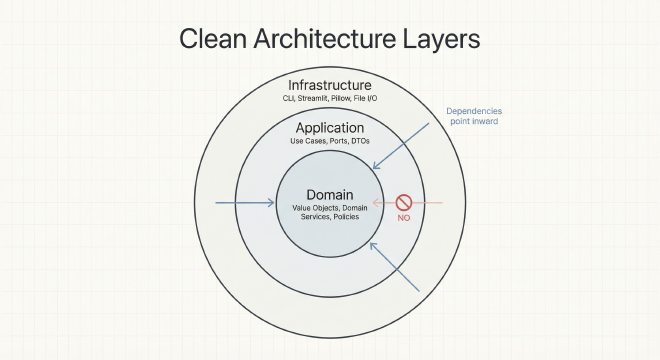
Mapping to Robert C. Martin’s Original Terminology
If you’ve read Martin’s “Clean Architecture” book, here’s how my implementation maps to his canonical four layers:
- Entities → My Domain Layer (value objects, domain services, business policies)
- Use Cases → My Application Layer (use case orchestrators, port definitions)
- Interface Adapters → My Application Layer (DTOs, data conversion) + Infrastructure adapters
- Frameworks & Drivers → My Infrastructure Layer (Pillow, Streamlit, CLI, file I/O)
Let me explain what each layer actually does in plain terms:
1. Domain Layer: Pure Business Logic
This is the heart of your application—the “what” and “why” of your business. In LifeClock, the domain layer knows:
- How to calculate life expectancy based on lifestyle factors
- How to resolve milestone dates to week indices on the grid
- How to validate that a birthdate is reasonable or a milestone isn’t in the future
What it doesn’t know: anything about Pillow image rendering, Streamlit forms, command-line arguments, or how data gets stored. It’s completely technology-agnostic.
2. Application Layer: Orchestration & Contracts
This layer coordinates domain logic to accomplish specific tasks (use cases) and defines contracts (ports) that outer layers must fulfill. In LifeClock, the application layer:
- Orchestrates the 10-step poster generation workflow
- Converts external data (DTOs) into domain objects
- Defines abstract interfaces like
PosterRendererthat say “I need something that can render a poster, but I don’t care if it uses Pillow, Cairo, or SVG”
Think of this as the conductor of an orchestra: it knows which instruments need to play when, but doesn’t care about the specific brand of violin you use.
3. Infrastructure Layer: The Real World
This is where rubber meets road—all the messy, concrete implementations. In LifeClock, the infrastructure layer:
- Uses Pillow to actually draw pixels and create PNG files
- Builds the Streamlit UI with forms, buttons, and file downloads
- Parses command-line arguments with argparse
- Manages Material Design icon files and WCAG contrast calculations
These components are adapters that implement the contracts defined by the application layer. Want to swap Pillow for a browser-based Canvas renderer? Write a new adapter that implements PosterRenderer. The domain and application layers don’t even know the change happened.
The Foundation: Understanding SOLID and Dependency Inversion#
Before diving into Clean Architecture layers, we need to understand the foundational principles that make it work. Clean Architecture is built on the SOLID principles—five design principles that guide object-oriented software design. Of these five, the Dependency Inversion Principle (DIP) is the architectural cornerstone.
What is the Dependency Inversion Principle?#
DIP states: High-level modules (business logic) should not depend on low-level modules (technical details). Both should depend on abstractions (interfaces).
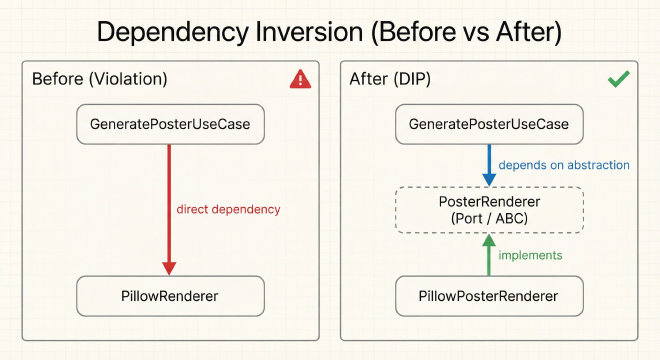
Let me break this down with a concrete example from LifeClock:
Before (Violation of DIP):
from infrastructure.pillow_renderer import PillowRenderer  # ❌ Direct dependency

class GeneratePosterUseCase:
    def __init__(self):
        self.renderer = PillowRenderer()  # Application depends on infrastructure!

    def execute(self, profile_data):
        # ... business logic ...
        return self.renderer.render(stats, milestones)
This seems innocent, but it creates a tight coupling problem. The use case (high-level business logic) directly imports and instantiates a concrete infrastructure class. This means:
- You can’t test the use case without Pillow installed
- Switching to a different renderer requires changing the use case code
- The use case knows about implementation details it shouldn’t care about
After (Following DIP):
from abc import ABC, abstractmethod

# Step 1: Define an abstraction in the APPLICATION layer
class PosterRenderer(ABC):
    """Abstract interface defining what a poster renderer must do.

    This contract is owned by the application layer—not infrastructure.
    """

    @abstractmethod
    def render(self, *, weeks_total: int, week_index: int,
               milestones: list, theme: str) -> bytes:
        """Render a poster and return PNG bytes."""
        pass

# Step 2: Use case depends ONLY on the abstraction
class GeneratePosterUseCase:
    def __init__(self, renderer: PosterRenderer):  # ✅ Depends on abstraction
        self.renderer = renderer

    def execute(self, profile_data):
        # ... business logic ...
        return self.renderer.render(stats, milestones)

# Step 3: Infrastructure implements the abstraction
class PillowPosterRenderer(PosterRenderer):  # Concrete implementation
    def render(self, *, weeks_total: int, week_index: int,
               milestones: list, theme: str) -> bytes:
        # ... Pillow-specific implementation ...
        return png_bytes
Notice what happened: we inverted the dependency direction. Instead of the use case depending on Pillow, we made Pillow depend on the contract that the use case defines. The application layer now owns the PosterRenderer interface, and infrastructure must conform to it.
Why Use Abstract Base Classes (ABC)?#
Python gives us two main ways to define interfaces: Abstract Base Classes (ABC) and Protocols. LifeClock primarily uses ABC for its port definitions, and here’s why:
What are Abstract Base Classes?
An ABC is a class that defines a contract with abstract methods that subclasses must implement. Python’s abc module provides this functionality:
from abc import ABC, abstractmethod

class IconManager(ABC):
    """Abstract port for icon management."""

    @abstractmethod
    def get_icon_by_key(self, key: str) -> IconDTO:
        """Get a specific icon by its key."""
        raise NotImplementedError

    @abstractmethod
    def get_curated_icons(self) -> list[IconDTO]:
        """Get all curated icons."""
        raise NotImplementedError
Benefits of ABC in LifeClock:
Explicit Contracts: Subclasses must explicitly inherit from the ABC and implement all abstract methods. You can’t accidentally forget to implement a method.
Runtime Validation: If you try to instantiate a class that inherits from an ABC but doesn’t implement all abstract methods, Python raises a
TypeErrorimmediately.IDE Support: IDEs like PyCharm and VS Code can warn you if a subclass doesn’t fully implement the ABC’s interface.
Documentation: When you see
class PillowPosterRenderer(PosterRenderer), it’s immediately clear that this is an implementation of a defined contract.
In LifeClock, I use ABC for the three main ports:
PosterRenderer: Defines how to render postersIconManager: Defines how to manage and retrieve iconsThemeManager: Defines how to handle themes and color validation
ABC vs Protocol: When to Use Which?
Python 3.8+ also introduced Protocols (structural subtyping), which don’t require explicit inheritance. Sam Keen’s “Clean Architecture with Python” discusses both approaches. Here’s the trade-off:
- Use ABC when: You want explicit, inheritance-based contracts with runtime validation (what LifeClock does)
- Use Protocol when: You want “duck typing” with static type checking, allowing existing classes to satisfy interfaces without modification
For LifeClock’s architecture, ABC provided the clarity and safety I wanted—if an adapter doesn’t fully implement a port, the code fails fast with a clear error message.
The Transformation: Before and After#
Let me show you concrete examples of how the refactor changed the code structure.
Before (CS50 Version):
# Everything in one place
def compute_expectancy(baseline, activity, smoking, sleep, height, weight):
    delta = 0.0
    if activity == "high": delta += 2.0
    if smoking == "heavy": delta -= 8.0
    # ... directly returns number
    return max(40, min(120, baseline + delta))
After (Clean Architecture):
# Domain Layer: Pure business logic
@dataclass(frozen=True)
class ExpectancyPolicy:
    """Encapsulates life expectancy adjustment rules."""

    def compute_delta(self, activity: str, smoking: str,
                      sleep_hours: int, bmi: float) -> float:
        delta = 0.0
        if activity == "high": delta += 2.0
        if smoking == "heavy": delta -= 8.0
        return delta

# Application Layer: Coordinates the logic
def calculate_expectancy_uc(profile_dto: ProfileDTO) -> float:
    """Use case: Calculate life expectancy."""
    policy = ExpectancyPolicy()
    profile = profile_dto.to_domain()
    return policy.apply(profile)
Why this matters: The policy can be tested without UI, database, or rendering. It’s pure logic that can run anywhere.
The file structure transformation tells the same story. What was once two files (project.py and helpers.py totaling 300 lines) became a clear directory hierarchy reflecting the architectural layers: domain/ for pure business logic, application/ for use cases and interfaces, and infrastructure/ for external adapters.
Layer by Layer: The Three Circles#
Domain Layer: The Heart#
The domain layer is where your business logic lives—the essence of what your application does, independent of how it’s built. This is the most valuable code in your entire system because it represents your actual problem domain.
What Makes Code “Domain Logic”?
Domain logic is code that would exist even if you changed programming languages, frameworks, or databases. For LifeClock:
- “Life expectancy decreases with heavy smoking” is domain logic
- “Draw a rectangle with Pillow at coordinates (x, y)” is infrastructure detail
The domain layer has zero external dependencies—it imports only from Python’s standard library (typing, dataclasses, datetime, enum, abc). No Pillow, no Streamlit, no Pydantic. This purity makes it incredibly testable and portable.
Domain-Driven Design: Building Rich Models
Value Objects: The Building Blocks
All domain objects use immutable dataclasses (@dataclass(frozen=True, slots=True)) with validation in __post_init__. This guarantees that if an object exists, it’s valid. The three core value objects are:
Profile: Captures user demographics and lifestyle factors (birthdate, activity level, smoking status, sleep hours, BMI). Validates that expectancy is 40-120 years and sleep is 4-12 hours.
LifeStats: Deterministic life statistics (age in days, total weeks, current week index, minutes remaining). Enforces the invariant that current week must fall within total weeks—if you can construct a
LifeStats, the math is correct.Milestone: A life event with label (max 50 chars), date, icon, and order. Validates that labels aren’t empty, dates aren’t in the future, and order values are non-negative for conflict resolution.
Here’s how validation works in practice:
@dataclass(frozen=True)
class Milestone:
    label: str
    date: date
    icon_key: str
    order: int = 0

    def __post_init__(self):
        if not self.label.strip():
            raise DomainValidationError("Label required")
        if self.date > date.today():
            raise DomainValidationError("Milestone cannot be in future")
If a Milestone object exists, it’s valid. No other layer needs to check.
Avoiding the Anemic Domain Model Trap
One of the most common mistakes in object-oriented design is creating “anemic domain models”—objects that are just data bags with getters and setters, no behavior. Eric Evans warns about this in his foundational book “Domain-Driven Design”: when your domain objects have no logic, all the business rules end up scattered in service classes or worse, in the UI layer.
Example of an Anemic Model (Bad):
# Just a data bag—no behavior, no protection
class Milestone:
    def __init__(self):
        self.label = ""
        self.date = None
        self.icon_key = ""
With this anemic model, validation and business rules end up elsewhere, often in multiple places:
# Business rules leaked into application or infrastructure layers
def create_milestone(label, date, icon_key):
    if not label.strip():
        raise ValueError("Label required")
    if date > datetime.now():
        raise ValueError("Future milestone invalid")
    # ... more validation scattered everywhere
Rich Domain Model (Good - What LifeClock Does):
Domain-Driven Design teaches us that domain objects should be intelligent—they should encapsulate and protect their own invariants. LifeClock uses immutable dataclasses with __post_init__ validation to create rich value objects:
from dataclasses import dataclass
from datetime import date

@dataclass(frozen=True, slots=True)
class Milestone:
    """A life milestone with automatic validation.

    This is a Value Object in DDD terminology—it's immutable and
    defined by its attributes, not by an identity.
    """
    label: str
    date: date
    icon_key: str
    order: int = 0

    def __post_init__(self):
        """Validate invariants when the object is created."""
        if not self.label.strip():
            raise DomainValidationError("Milestone label cannot be empty")
        if self.date > date.today():
            raise DomainValidationError("Milestone cannot be in the future")
        if len(self.label) > 50:
            raise DomainValidationError("Label too long (max 50 characters)")
        if self.order < 0:
            raise DomainValidationError("Order must be non-negative")
Now the business rules are where they belong—inside the domain object itself. If a Milestone object exists, you know it’s valid. No other layer needs to check. This is what Evans calls “making illegal states unrepresentable.”
Key DDD Concepts in LifeClock:
1. Value Objects vs Entities
DDD distinguishes between two types of domain objects:
Entities: Objects defined by a unique identity that persists over time. Even if all attributes change, it’s still the “same” entity. (Example: a User with an ID)
Value Objects: Objects defined purely by their attributes, with no unique identity. Two value objects with identical attributes are considered equal and interchangeable.
LifeClock uses primarily Value Objects because milestones, profiles, and life statistics don’t need persistent identity—they’re defined by their data:
# These are the same milestone, even though they're different objects
milestone1 = Milestone("Graduated", date(2020, 6, 1), "school")
milestone2 = Milestone("Graduated", date(2020, 6, 1), "school")
assert milestone1 == milestone2  # True! Value Objects are compared by value
2. Immutability for Safety
All domain Value Objects use frozen=True, making them immutable. Once created, they can’t be changed. Why?
- Thread Safety: Immutable objects are automatically thread-safe
- Predictability: No “action at a distance”—you know an object can’t change under you
- Hashability: Immutable objects can be used in sets and as dictionary keys
If you need to “change” a value object, you create a new one:
# Can't do this: milestone.label = "New label"  # ❌ FrozenInstanceError

# Instead, create a new milestone
updated_milestone = Milestone(
    label="New label",
    date=milestone.date,
    icon_key=milestone.icon_key,
    order=milestone.order
)
3. Domain Services: Pure Functions for Complex Logic
Some business logic doesn’t naturally belong to any single object—it coordinates multiple domain concepts or performs calculations. These become Domain Services—pure functions that take domain objects as input and return results:
def compute_expectancy(
    profile: Profile,
    policy: ExpectancyPolicy
) -> float:
    """Domain service: calculates adjusted life expectancy.

    This is pure logic—same inputs always produce same output,
    no side effects, no hidden dependencies.
    """
    baseline = profile.baseline_expectancy
    delta = policy.compute_delta(
        profile.activity,
        profile.smoking,
        profile.sleep_hours,
        compute_bmi(profile.height_cm, profile.weight_kg)
    )
    return clamp(baseline + delta, min_years=40, max_years=120)
Domain services have no state, no side effects—they’re mathematical functions operating on domain concepts. You can test them with simple assertions, no mocks required.
The Policy Pattern: Configurable Business Rules
The ExpectancyPolicy encapsulates all life expectancy adjustment rules as configurable deltas. Instead of hardcoding “high activity adds 2 years” in a calculation, we store it as data in dictionaries and callable functions:
activity_deltas: HIGH +2.0 years, MODERATE 0.0, LOW -2.0smoking_deltas: HEAVY -8.0 years, LIGHT -3.0, NONE 0.0sleep_delta: Optimal sleep (6-9 hours) +0.5 years, else -1.0bmi_delta: Healthy BMI (18.5-25) +0.5 years, obese (≥30) -3.0
The policy’s apply() method sums all deltas and clamps the result to 40-120 years. This separation makes the rules explicit, testable in isolation, and easily configurable. Want to adjust the smoking penalty? Change one number in the policy, not scattered throughout calculation code.
@classmethod
def default(cls) -> "ExpectancyPolicy":
    """Factory: Standard policy with evidence-based deltas."""
    return cls(
        activity_deltas={Activity.HIGH: 2.0, Activity.LOW: -2.0, ...},
        smoking_deltas={Smoking.HEAVY: -8.0, Smoking.LIGHT: -3.0, ...},
        sleep_delta=lambda hours: 0.5 if 6 <= hours <= 9 else -1.0,
        bmi_delta=lambda bmi: 0.5 if 18.5 <= bmi < 25 else ...
    )
Domain Services: Pure Business Logic
Domain services orchestrate value objects and policies without side effects. They’re pure functions—same input always produces same output, no hidden dependencies:
compute_expectancy(): Takes aProfileandExpectancyPolicy, returns adjusted years. No database calls, no file I/O, just math.resolve_milestones(): Maps milestone dates to week indices on the life grid, clamping dates that fall outside the expected lifespan. If you add a milestone for 2050 but your grid only goes to 2045, it clamps to the last week and flagswas_clamped=True.compute_life_stats(): Given a birthdate and expectancy, calculates total weeks, current week index, and minutes remaining. Pure calculation, deterministic output.
The key insight: These services can be tested without mocks, databases, or UI. Pass in value objects, assert the output. No setup, no teardown, no flaky tests.
Application Layer: The Orchestrator#
The application layer is the coordinator—it answers the question “what can this application do?” by defining use cases (workflows) and the interfaces (ports) that infrastructure must satisfy. This layer sits between domain (pure logic) and infrastructure (messy details), translating between them.
Three Responsibilities of the Application Layer:
- Define Use Cases: Orchestrate domain logic to accomplish specific tasks
- Define Ports (Abstract Interfaces): Specify what the application needs from infrastructure, without caring about implementations
- Provide DTOs: Handle data conversion between external formats and internal domain objects
Let me explain each in detail.
Data Transfer Objects (DTOs): The Boundary Guards
DTOs are simple data structures that carry information across layer boundaries. They serve a critical purpose: keeping domain objects pure while allowing the application to validate external input.
Why not just pass dictionaries or use domain objects directly? Because:
- Dictionaries are untyped—you don’t know what fields exist or what types they should be
- Domain objects should never be exposed to external layers (that would create coupling)
- You need a place to validate user input before it touches the domain
LifeClock uses Pydantic for DTOs, which provides automatic validation, type checking, and helpful error messages:
from pydantic import BaseModel, Field
from typing import Literal

class ProfileDTO(BaseModel):
    """DTO for profile data coming from CLI or Streamlit.

    Pydantic automatically validates types and constraints.
    """
    name: str | None = None
    birthdate: date
    baseline_expectancy: float = Field(ge=40.0, le=120.0)  # Must be 40-120
    activity: Literal["low", "moderate", "high"] = "moderate"
    smoking: Literal["none", "light", "heavy"] = "none"
    sleep_hours: int = Field(ge=4, le=12)  # Must be 4-12 hours
    height_cm: float = Field(gt=0)  # Must be positive
    weight_kg: float = Field(gt=0)  # Must be positive

    def to_domain(self) -> Profile:
        """Convert validated DTO to domain Value Object."""
        return Profile(
            name=self.name,
            birthdate=self.birthdate,
            baseline_expectancy=self.baseline_expectancy,
            activity=Activity[self.activity.upper()],  # String → Enum
            smoking=Smoking[self.smoking.upper()],
            sleep_hours=self.sleep_hours,
            height_cm=self.height_cm,
            weight_kg=self.weight_kg
        )
When invalid data arrives, Pydantic provides clear feedback:
try:
    profile = ProfileDTO(
        birthdate="1990-01-01",
        height_cm=175,
        weight_kg=-70  # ❌ Negative weight!
    )
except ValidationError as e:
    print(e)
    # "weight_kg: ensure this value is greater than 0"
The DTO Flow:
User Input → DTO (validate) → Domain Object (pure logic) → DTO → Output
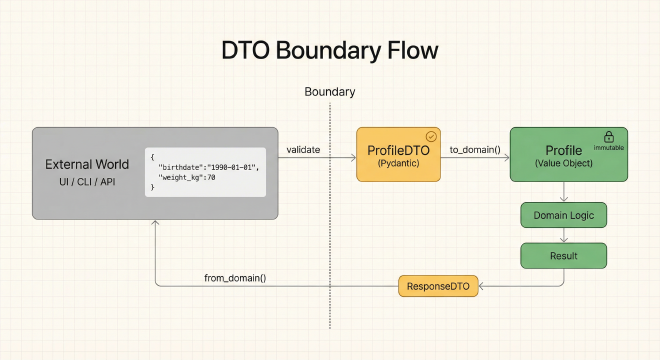
This creates a clean separation: validation happens at the boundary (DTO), domain logic operates on guaranteed-valid objects, and output is formatted back through DTOs.
Ports: Defining What You Need, Not How It Works
The application layer needs certain capabilities from infrastructure—rendering posters, managing icons, handling themes. But it shouldn’t know how these things are implemented. This is where ports come in.
A port is an abstract interface (using Python’s ABC) that defines a contract. Infrastructure provides adapters that implement these contracts. This is the classic “Ports and Adapters” pattern, also known as “Hexagonal Architecture.”
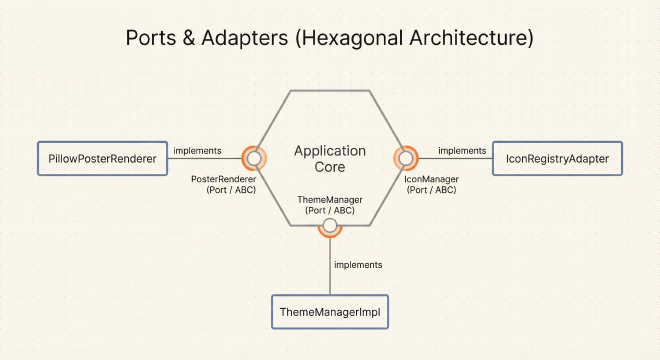
The Three Main Ports in LifeClock:
1. PosterRenderer Port
from abc import ABC, abstractmethod
from collections.abc import Sequence

class PosterRenderer(ABC):
    """Abstract port: defines what a poster renderer must do.

    The application layer owns this interface. Infrastructure adapters
    (like PillowPosterRenderer) must implement it.
    """

    @abstractmethod
    def render(
        self,
        *,
        weeks_total: int,
        week_index: int,
        milestones: Sequence[ResolvedMilestone],
        birthday_indices: Sequence[int],
        title: str,
        subtitle: str,
        theme: ThemeName,
        theme_tokens: dict[str, str | float] | None = None,
        visual_treatment: VisualTreatment | None = None,
        legend: Legend | None = None,
        icon_registry: IconManager | None = None,
    ) -> bytes:
        """Render a poster and return PNG bytes.

        This method signature is the contract. Any renderer—Pillow, Cairo,
        SVG, HTML Canvas—must accept these parameters and return bytes.
        """
        raise NotImplementedError
Notice what this interface does not specify:
- Which image library to use (Pillow? PIL? Cairo?)
- How to draw shapes or layout the grid
- Where to save files or whether to cache results
It only specifies the inputs needed and the output format. The infrastructure is free to implement this however it wants, as long as it honors the contract.
2. IconManager Port
class IconManager(ABC):
    """Abstract port for icon management."""

    @abstractmethod
    def get_curated_icons(self) -> list[IconDTO]:
        """Get the set of curated icons available for milestones."""
        raise NotImplementedError

    @abstractmethod
    def get_icon_by_key(self, key: str) -> IconDTO:
        """Retrieve a specific icon by its key."""
        raise NotImplementedError

    @abstractmethod
    def validate_icon_key(self, key: str) -> bool:
        """Check if an icon key exists."""
        raise NotImplementedError

    @abstractmethod
    def get_fallback_icon(self) -> IconDTO:
        """Get a guaranteed fallback icon for when requested icon doesn't exist."""
        raise NotImplementedError
This interface doesn’t care if icons come from Material Design files, Font Awesome, an API, or a database. It just defines the operations the application needs.
3. ThemeManager Port
class ThemeManager(ABC):
    """Abstract port for theme management and validation."""

    @abstractmethod
    def get_theme_preset(self, theme: ThemeName) -> dict[str, str | float]:
        """Load a theme preset (retro, mono, etc.)."""
        raise NotImplementedError

    @abstractmethod
    def apply_theme_overrides(
        self,
        base_tokens: dict[str, str | float],
        overrides: dict[str, str | float]
    ) -> dict[str, str | float]:
        """Apply user customizations to a base theme."""
        raise NotImplementedError

    @abstractmethod
    def validate_theme_contrast(
        self,
        tokens: dict[str, str | float]
    ) -> tuple[bool, list[str]]:
        """Validate that theme meets WCAG AA contrast requirements.

        Returns: (is_valid, list_of_warnings)
        """
        raise NotImplementedError
Why ABC Instead of Duck Typing?
Python is dynamically typed—you could just pass any object and hope it has the right methods. But using ABC provides:
- Explicit Contracts: When you see
class PillowRenderer(PosterRenderer), it’s immediately clear this is implementing a defined interface - Early Error Detection: If you forget to implement a method, Python raises
TypeErrorwhen you try to instantiate the class - IDE Support: Your editor can autocomplete methods and warn about missing implementations
- Documentation: The ABC serves as living documentation of what infrastructure must provide
Use Cases: Orchestrating the Workflow
Use cases are the application layer’s main deliverable—they coordinate domain services, DTOs, and ports to accomplish specific user goals.
The generate_poster_uc is the primary use case—it orchestrates the entire poster generation workflow in 10 distinct, testable steps:
def generate_poster_uc(
    request: GeneratePosterRequest,
    renderer: PosterRenderer,
    icon_manager: IconManager,
    theme_manager: ThemeManager
) -> GeneratePosterResponse:
    """Use case: Generate a life poster from validated input.

    This function is pure orchestration—it doesn't contain business logic,
    it calls domain services that do. It doesn't know about Pillow or
    Streamlit, it works through abstract ports.
    """

    # Step 1: Convert DTOs to domain objects
    profile = request.profile.to_domain()
    milestone_list = [m.to_domain() for m in request.milestones]

    # Step 2: Compute life expectancy (domain service)
    policy = ExpectancyPolicy.default()
    expectancy_years = compute_expectancy(profile, policy)

    # Step 3: Compute life statistics (domain service)
    stats = compute_life_stats(profile.birthdate, expectancy_years)

    # Step 4: Resolve milestones to week indices (domain service)
    resolved = resolve_milestones(
        milestone_list,
        profile.birthdate,
        stats.weeks_total
    )

    # Step 5: Handle conflicts (multiple milestones on same week)
    resolved = resolve_milestone_conflicts(resolved)

    # Step 6: Compute birthday indices (domain service)
    birthdays = compute_birthday_week_indices(
        profile.birthdate,
        stats.weeks_total
    )

    # Step 7: Generate title and subtitle
    title, subtitle = generate_poster_labels(profile, expectancy_years)

    # Step 8: Load and apply theme
    theme_tokens = theme_manager.get_theme_preset(request.theme)
    if request.theme_overrides:
        theme_tokens = theme_manager.apply_theme_overrides(
            theme_tokens,
            request.theme_overrides
        )

    # Step 9: Validate theme contrast (WCAG AA compliance)
    is_valid, warnings = theme_manager.validate_theme_contrast(theme_tokens)

    # Step 10: Render through the port (infrastructure does the work)
    png_bytes = renderer.render(
        weeks_total=stats.weeks_total,
        week_index=stats.week_index,
        milestones=resolved,
        birthday_indices=birthdays,
        title=title,
        subtitle=subtitle,
        theme=request.theme,
        theme_tokens=theme_tokens,
        icon_registry=icon_manager
    )

    return GeneratePosterResponse(
        image_data=png_bytes,
        expectancy_years=expectancy_years,
        stats=stats,
        milestones=resolved,
        theme_warnings=warnings
    )
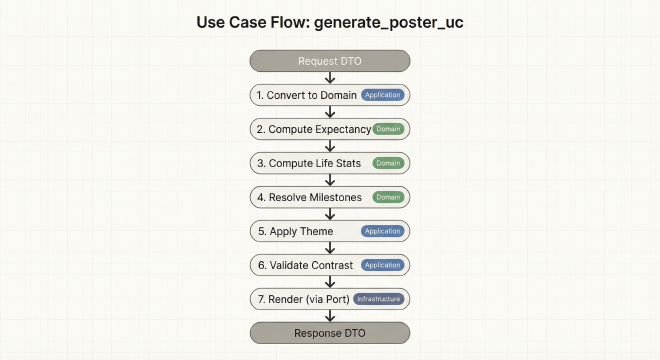
What Makes This Good Architecture?
Single Responsibility: Each step does one thing. Birthday calculation logic lives in a domain service, not mixed into the use case.
Testability: You can test each domain service independently with simple assertions. No need to mock Pillow or Streamlit.
Flexibility: Want to add email delivery? Add step 11 that calls an
EmailSenderport. Want to cache results? Add step 0 that checks aCacheManagerport. The existing steps don’t change.Readability: A developer can read this function and understand the entire poster generation workflow in 60 seconds.
Ports: Infrastructure Contracts
Here’s the complete definition of the three main ports with all their methods:
- Validate request — Pydantic DTOs catch malformed input
- Convert to domain — DTOs become immutable value objects
- Compute expectancy — Apply policy deltas to baseline
- Compute life stats — Calculate total weeks, current index
- Resolve milestones — Map dates to week indices
- Handle conflicts — When multiple milestones fall on same week, use order field
- Compute birthdays — Special handling for Feb 29 leap year edge case
- Generate titles — Build title/subtitle from profile
- Apply theme — Start with preset, apply user overrides
- Render — Call PosterRenderer port (dependency inversion)
Each step is a single responsibility. The use case coordinates but doesn’t implement the logic—that lives in domain services. If birthday calculation needs fixing, you change one domain function. The use case stays unchanged.
Here’s the contract the use case depends on:
class PosterRenderer(Protocol):
    def render(
        self,
        stats: LifeStats,
        milestones: list[ResolvedMilestone],
        theme: VisualTreatment
    ) -> bytes:
        """Render poster to PNG bytes."""
        ...
The use case doesn’t know about Pillow. We could swap in SVG, PDF, or HTML canvas by implementing this interface.
Ports: Infrastructure Contracts
The application layer defines abstract interfaces that infrastructure must implement. Three key ports:
PosterRenderer:
render()takes life stats, milestones, theme, and returns PNG bytes. The application doesn’t care if you use Pillow, Cairo, or Playwright—just implement this interface.IconManager:
get_icon_by_key()retrieves icons by name,get_curated_icons()returns a UI-friendly list. Whether icons come from Material Design, Font Awesome, or a database is infrastructure’s concern.ThemeManager:
get_theme_preset()loads retro/mono themes,validate_theme_contrast()ensures WCAG AA compliance. The validation logic lives in infrastructure, but the application enforces the contract.
Key insight: The use case doesn’t know about Pillow, Streamlit, or Material Design icons. It only knows the contracts (ports). This is Dependency Inversion in action—the inner layer owns the interface, the outer layer conforms to it.
Why Protocol over ABC?
Python’s Protocol (introduced in PEP 544) enables structural subtyping—“duck typing with static guarantees.” Unlike ABC’s inheritance-based approach, Protocols let us define behavior without forcing an inheritance hierarchy. As Sam Keen emphasizes in “Clean Architecture with Python,” this aligns better with Python’s dynamic nature while maintaining architectural boundaries that tools like mypy can verify.
The PillowPosterRenderer implements PosterRenderer without inheriting from it—just by having a matching render() signature. This is Pythonic dependency inversion.
Infrastructure Layer: The Adapters#
This is where the messy real-world details live—Pillow rendering, Streamlit UI components, CLI argument parsing, file I/O, and the theme system. These adapters implement the contracts defined by the application layer.
Renderer: Specialized Factories
The PillowPosterRenderer uses the factory pattern to create specialized configurations without modifying code:
for_print(): 300 DPI with 4x scale factor for professional printing. The same grid calculation, but much higher resolution.for_large_lifespans(): Smaller cells (8px instead of 12px) with reduced font scale (0.8x) for centenarians. Fits 100+ years on screen without scrolling.
The renderer calculates layout dynamically: 52 columns (weeks per year), rows = total weeks ÷ 52, plus a legend section whose height scales with milestone count. Icons are rendered with automatic contrast-based color selection—if an icon would be invisible on its background (contrast ratio < 4.5:1), the renderer switches to black or white for maximum visibility.
This is WCAG AA compliance (4.5:1 for normal text) happening at render time, not as an afterthought.
Adapters: Bridging Infrastructure to Ports
Infrastructure components are wrapped in adapters that implement application ports. The IconRegistryAdapter is a perfect example: it wraps the concrete IconRegistry (which knows about Material Design icon files, Unicode characters, SVG paths) and exposes only the IconManager interface that the application expects.
This adapter pattern is the bridge between “how icons actually work” (infrastructure detail) and “what icons do” (application contract). Want to switch from Material Design to Font Awesome? Write a new adapter. The application layer never knows the difference.
Material Design Icons & WCAG Compliance
The icon registry includes 12+ curated Material Design icons (school, work, home, favorite, flight, cake, fitness_center, star, etc.) with automatic contrast adjustment. When rendering an icon on a colored background, the system calculates the luminance contrast ratio. If it’s below 4.5:1 (WCAG AA minimum), it switches to pure black or white for maximum visibility. The theme system validates this in real-time during customization, warning users before they create an inaccessible poster.
CLI: From Arguments to Use Cases
The CLI adapter parses command-line arguments and converts them to DTOs that use cases understand. Milestones come in as "Graduated|2012-06-15|school" strings, get split and validated, then packaged into MilestoneDTO objects. The key insight: CLI, Streamlit UI, and a future REST API all create the same GeneratePosterRequest DTO and call the same generate_poster_uc use case. Zero logic duplication—just different ways to build the request.
The Power of Separation: What We Gained#
Testability#
The CS50 version had 25 tests—all integration tests where testing birthday logic meant setting up rendering, fonts, and file I/O. The refactored version has 303 tests organized into four categories, each serving a specific purpose.
Unit Tests: Isolated Domain Logic
Domain layer tests are pure—no mocks, no databases, no rendering. They test business logic in complete isolation. For example, testing that high activity adds 2 years to expectancy requires only a Profile object and an ExpectancyPolicy. No Pillow setup, no file I/O, just pure math. Testing that milestones can’t be in the future? Try creating one with tomorrow’s date and assert it raises DomainValidationError. Fast, deterministic, no flaky failures.
Integration Tests: End-to-End Workflows
Integration tests verify the entire poster generation pipeline from request DTO to PNG bytes. The standout is test_wysiwyg (What You See Is What You Get)—it verifies that Streamlit’s preview uses the exact same generate_poster_uc use case and renderer as export. Preview bytes must match export bytes pixel-for-pixel. This test caught a bug where preview used default theme while export respected user selection.
Architecture Tests: Fitness Functions
Keen calls these Fitness Functions—automated verification that architecture stays intact as code evolves. These tests enforce the Dependency Rule, catching violations before they rot the codebase.
These tests use Python’s Abstract Syntax Tree to statically analyze imports. test_domain_has_zero_external_dependencies parses domain Python files and checks that imports only come from stdlib (typing, dataclasses, abc, datetime, enum). If someone adds import pillow in the domain layer, CI fails immediately—before code review, before merge.
test_modules_under_size_limit enforces that no module exceeds 600 lines (hard limit) or 400 lines (soft limit with warnings). This prevents “God objects” and encourages proper decomposition. test_no_circular_dependencies builds a dependency graph and detects cycles—again, caught at CI time, not in production.
Contract Tests: Interface Validation
Contract tests verify that themes and icons meet their contracts. test_all_theme_presets_meet_wcag_aa calculates the contrast ratio between text/icons and backgrounds for both “retro” and “mono” themes, asserting they all exceed 4.5:1 (WCAG AA minimum). test_all_icons_have_required_fields verifies every curated icon has a valid key (Python identifier), display name, and either Unicode character or SVG path data—ensuring icons are actually renderable.
The test pyramid: 60% unit tests (fast, isolated), 25% integration tests (slower, comprehensive), 10% architecture tests (CI enforcement), 5% contract tests (interface validation). Architecture tests are the secret weapon—they prevent architectural decay automatically.
Extensibility#
New features no longer require rewriting existing code. Want themes? Implement the ThemeManager port. Want PDF output? Write another PosterRenderer. Want a mobile app? Reuse the same use cases. The CLI and Streamlit versions demonstrate this perfectly—same business logic, different interfaces:
# CLI version
def cli_main():
    request = build_request_from_args()
    renderer = PillowPosterRenderer()
    response = generate_poster_uc(request, renderer)
    save_image(response.image_data)

# Streamlit version
def streamlit_main():
    request = build_request_from_form()
    renderer = PillowPosterRenderer()
    response = generate_poster_uc(request, renderer)
    st.download_button("Download", response.image_data)
No duplication. Just different ways to call the same orchestration.
Maintainability#
In the monolith, changing birthday logic could break rendering, UI, and tests—every change rippled unpredictably. With Clean Architecture, changing birthday logic only requires updating domain tests. Everything else still works because changes stay within their layer.
Validation at Every Layer#
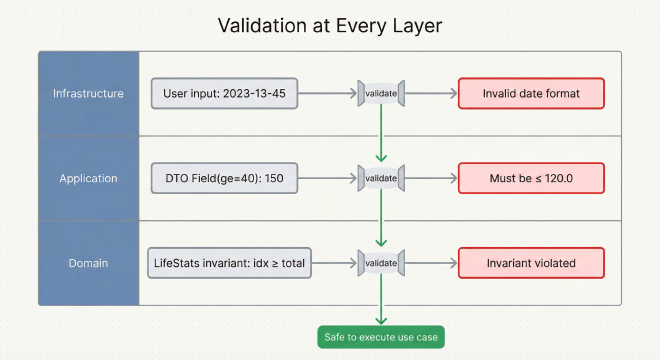
One of Clean Architecture’s strengths is defense in depth: each layer validates data at its appropriate level, catching errors early with meaningful feedback.
Domain Validation: Business Invariants
The domain layer enforces business invariants through immutable dataclasses with __post_init__ validation. For example, LifeStats checks that the current week index falls within total weeks—a mathematical invariant that must always hold. If age_days or minutes_remaining are negative, it raises DomainValidationError. Domain validation is about protecting business rules that define what “valid” means for your core concepts.
Application Validation: Input Constraints
The application layer uses Pydantic to validate external input before it reaches the domain. DTOs define constraints with Field validators: baseline_expectancy: float = Field(ge=40.0, le=120.0) means the application won’t even try to create a domain object if expectancy is 150 years. When validation fails, Pydantic provides rich error messages: "ensure this value is less than or equal to 120.0". No cryptic exceptions—users get actionable feedback with field names and constraints.
Infrastructure Validation: User Input Sanitization
The infrastructure layer handles UI-level validation—parsing dates from strings, sanitizing user input, preventing injection. The CLI parses milestone arguments as "Label|YYYY-MM-DD|icon_key" and validates the format before creating DTOs. If the date string is malformed, you get "Invalid date format: 2023-13-45 (expected YYYY-MM-DD)" immediately, not a stack trace deep in domain logic.
Error Flow
Errors bubble up with context at each layer:
Infrastructure: Parse "2023-13-45" → Error: "Invalid date format"
Application: Field(ge=40) validates 150 → Error: "Must be ≤ 120.0"
Domain: LifeStats checks 0 ≤ idx < total → Error: "Invariant violated"
This multi-layer strategy catches errors at the right level, making debugging straightforward.
New Features Enabled by Architecture#
Once the layers were separated, adding features became straightforward. The architecture made three major additions possible.
Milestone System#
You can now add unlimited milestones with custom icons—graduations, weddings, career changes, births. The milestone system demonstrates Clean Architecture’s power: domain validation, application orchestration, and infrastructure rendering all work together seamlessly.
Conflict Resolution
When multiple milestones fall on the same week, the system groups them by week index and keeps only the highest-order milestone from each group. The order field determines priority—order 2 wins over order 1 if both land on week 1,234. This simple rule prevents visual clutter where icons would overlap.
ResolvedMilestone: The Bridge
ResolvedMilestone maps a Milestone (domain concept with date) to a specific week_index (rendering coordinate). If you add a milestone for 2050 but your grid only extends to 2045, it clamps to the last week and sets was_clamped=True. This flag lets the UI warn users: “This milestone extends beyond your expected lifespan.”
CRUD Operations
The milestone service provides create_milestone_list(), add_milestone_to_list(), remove_milestone_from_list(), and reorder_milestone_in_list(). Each returns a new immutable list—functional programming style. The Streamlit UI uses these to let you reorder milestones with ⬆️/⬇️ buttons or delete them with 🗑️.
Material Design Icons
The infrastructure provides 12+ curated Material Design icons organized by category: education (school, menu_book), career (work, business_center), personal (favorite, cake), places (home, location_on), experiences (flight, auto_awesome), and misc (fitness_center, star). Each icon renders with automatic contrast-based color selection—if an icon would be invisible on its background, the renderer switches to black or white for WCAG AA compliance.
Theme System#
The theme system uses a token-based approach with two built-in presets and full customization capability. Themes are validated in real-time for accessibility compliance.
Theme Tokens
A VisualTreatment value object defines the complete visual palette: background color, text color, grid line color, three week-fill colors (past/current/future), birthday tint, icon color, grid line weight, and icon scale. That’s 9 customizable parameters. The “retro” theme uses warm browns and creams (#F5E6D3 background, #8B7355 past weeks, #D4A574 current week). The “mono” theme uses pure grayscale (#FFFFFF background, #9E9E9E past weeks, #616161 current week) optimized for high-contrast printing.
Override Mechanism
Start with a preset, override specific tokens. Want retro colors but with a pure white background? Load “retro” preset, override background: "#FFFFFF". The theme manager applies your overrides and validates contrast ratios. If text-on-background contrast drops below 4.5:1 (WCAG AA minimum), the UI warns you immediately: “Text on background has low contrast (3.2:1)”. The validation uses luminance-based contrast calculation, the same formula accessibility auditors use.
The Streamlit UI displays these warnings as you adjust colors, preventing users from creating inaccessible posters. You can still override the warnings (your poster, your choice), but you make an informed decision.
Streamlit Web UI#
The biggest addition is a complete web interface built entirely on top of existing use cases—form-based input with validation, live preview, milestone management, theme customization with color pickers, real-time statistics, and one-click download. Because the business logic already lived in reusable use cases, building the Streamlit UI was mostly wiring up form fields to function calls.
The Streamlit UI is an implementation of the Humble Object Pattern—deliberately kept logic-free so it’s “too humble to break.” All formatting, validation, and business logic lives in DTOs, use cases, and domain services. The UI just displays and captures input. This makes the view itself nearly untestable and unnecessary to test—the testable logic is elsewhere.
The UI walks you through the poster creation process step by step. Let me show you how it flows:
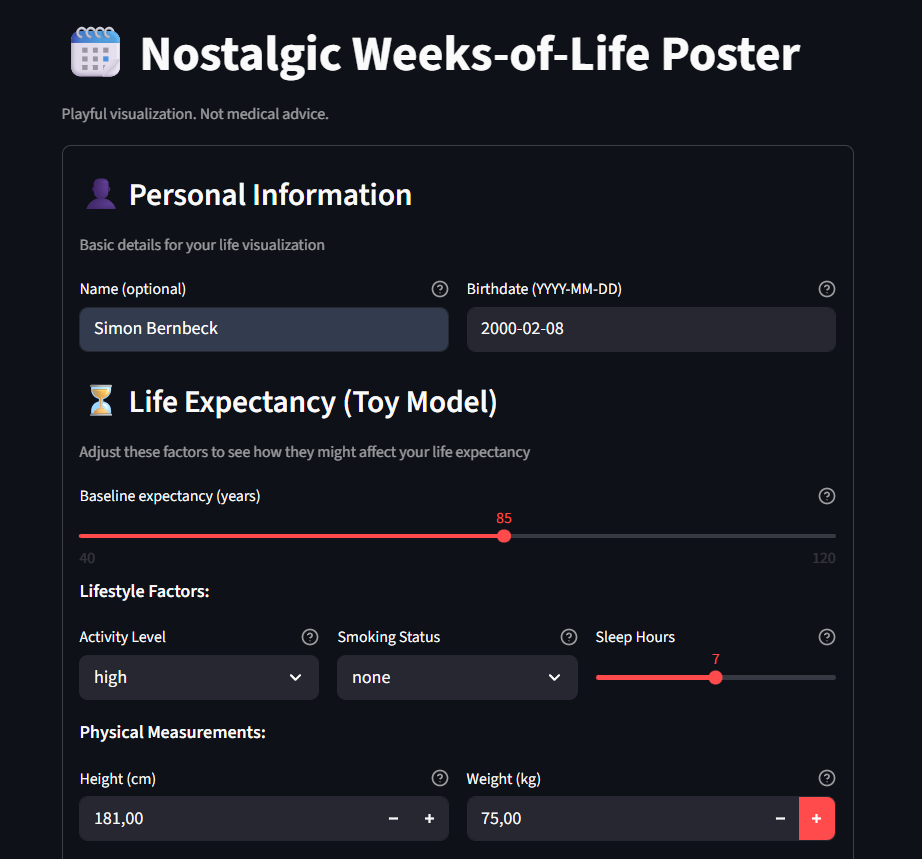
You start by entering your name (optional), birthdate (the anchor for the entire grid), and baseline life expectancy. Then you adjust for lifestyle factors—activity level, smoking status, sleep hours—and physical measurements (height and weight for BMI). It’s intentionally a toy model for visualization, not medical advice, but it gives the grid something to work with.
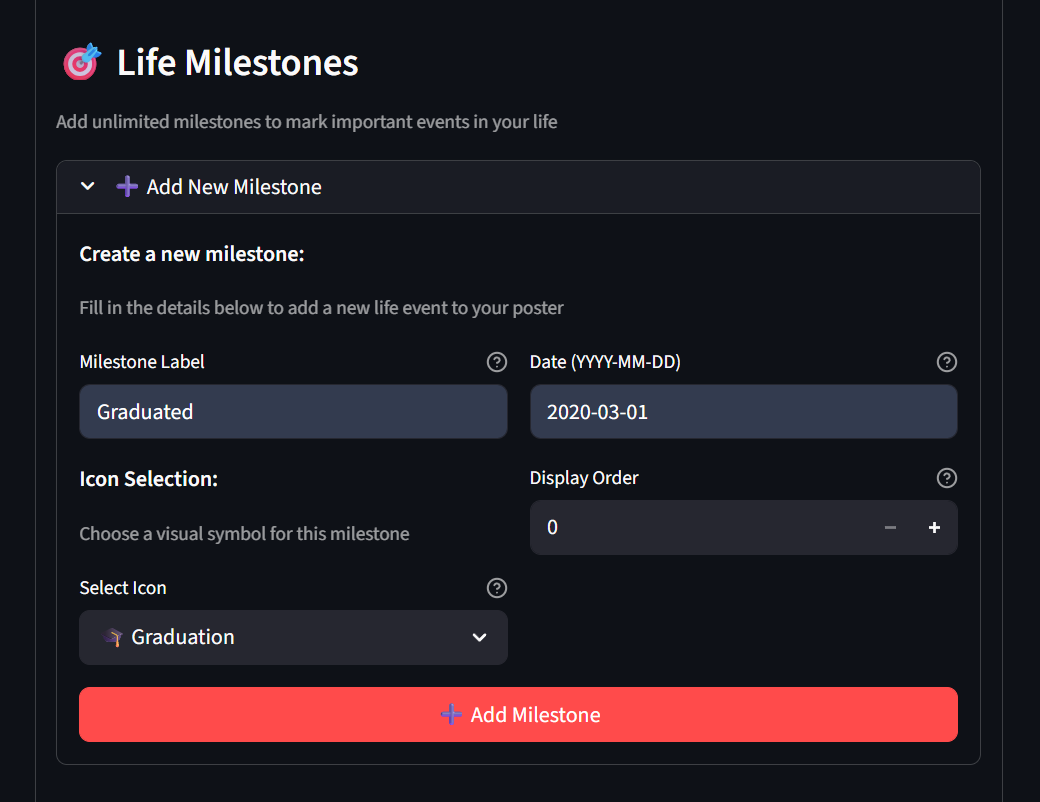
Next, you add milestones: graduations, career changes, births. Each gets a label, date, icon, and display order (for when multiple events land on the same week). The milestone manager lets you reorder or delete them as you iterate.
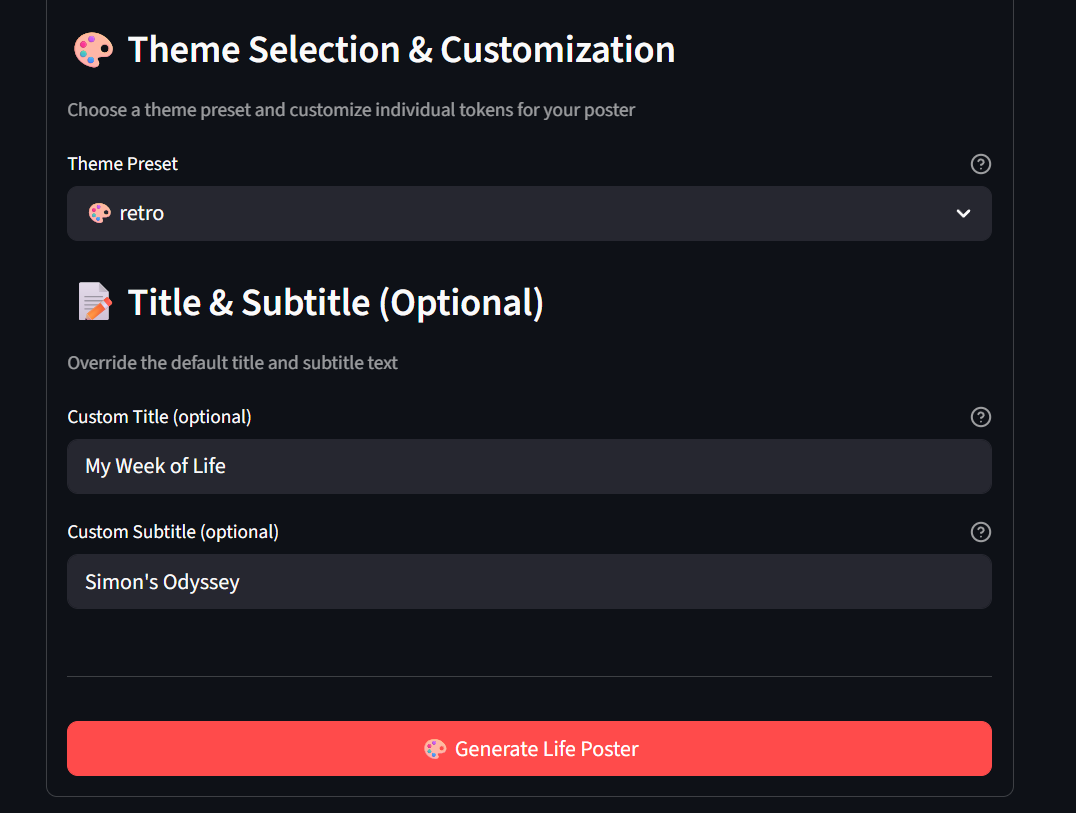
The theme selector offers “retro” (warm vintage colors) or “mono” (grayscale, safer for printing), with optional overrides for the poster title and subtitle.
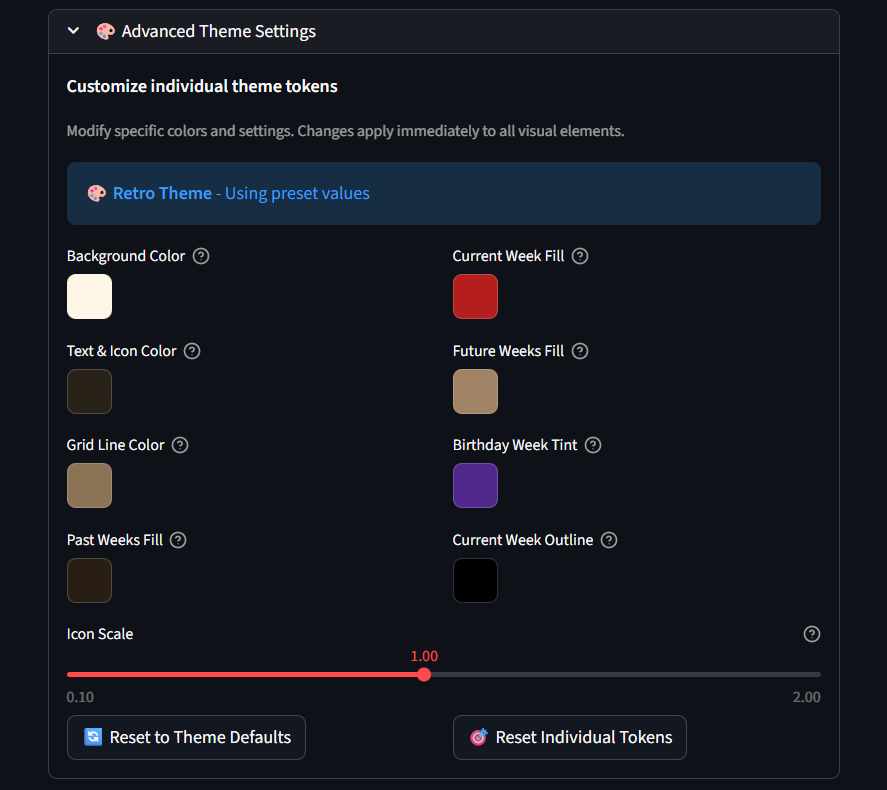
If you want deeper customization, advanced theme settings let you fine-tune background colors, grid lines, week fills, birthday tints, text colors, and icon scale. The UI warns you if your combinations risk low contrast, and you can reset to defaults at any time.
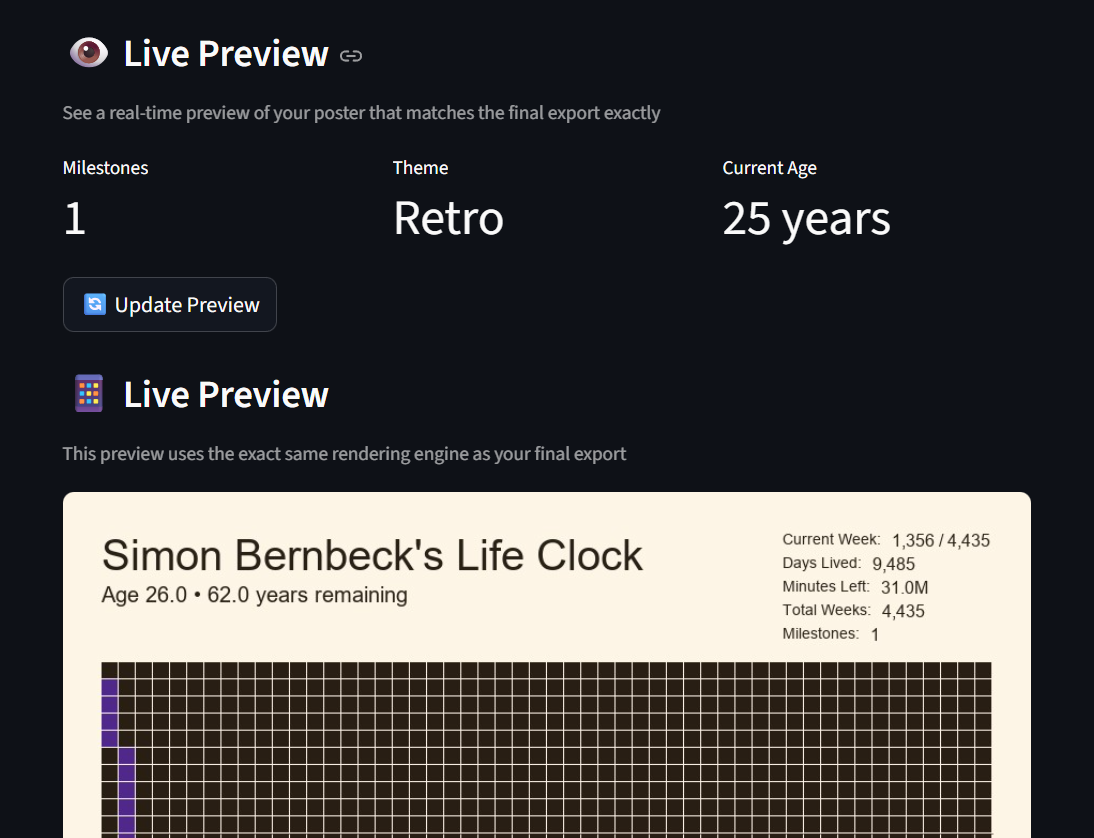
The live preview is the killer feature—it uses the exact same generate_poster_uc use case and Pillow renderer as the final export, so what you see is what you get. You’ll see metrics (milestone count, current age, theme), then click “Update Preview” to regenerate.
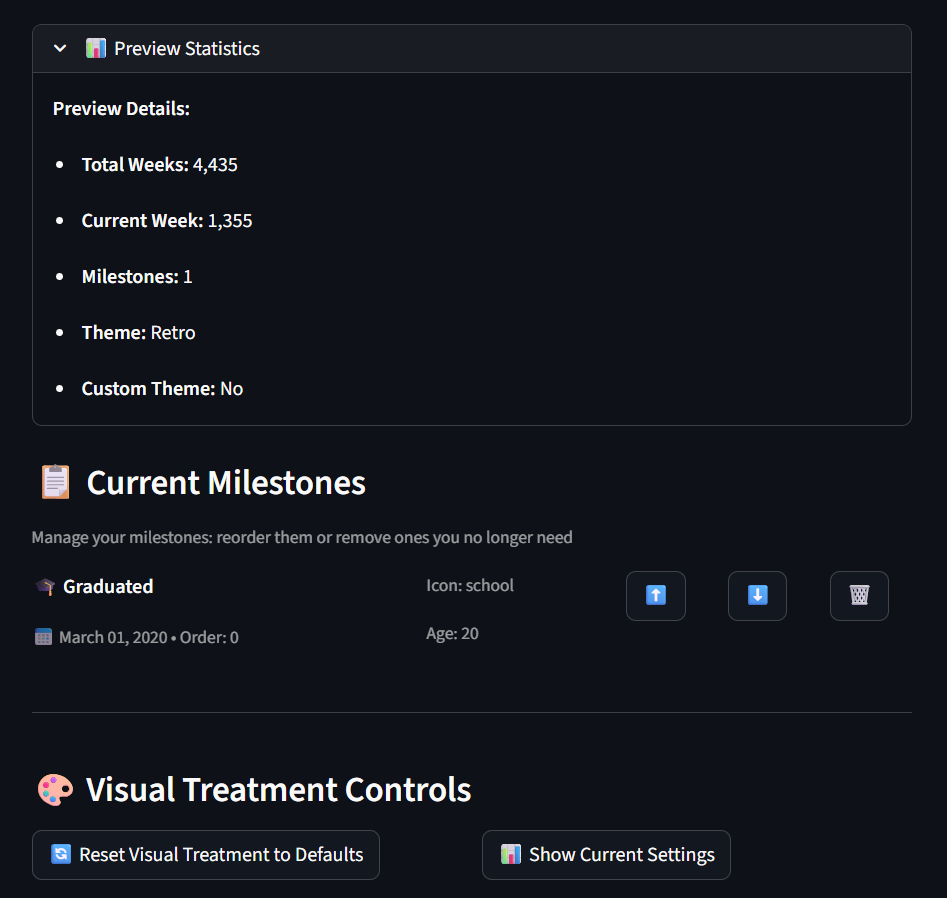
Finally, the preview statistics panel shows total weeks, current week index, milestone count, and whether you’re using a custom theme. The milestone manager lets you reorder (⬆️/⬇️) or delete (🗑️) events, and the visual treatment controls let you reset or snapshot your settings.
The result: anyone can generate a poster, no command-line knowledge required. And if you need professional-quality physical output, the print mode (PillowPosterRenderer.for_print()) generates 300 DPI images you can frame and hang.
Lessons Learned#
Looking back, four principles guided the refactor:
Start simple, refactor when pain emerges. I didn’t build Clean Architecture for CS50—I built the simplest thing that worked. Only when I wanted to add milestones and themes did the monolith’s pain become clear. That’s the right time to refactor. Don’t over-architect from the start.
Architecture is about boundaries. Clean Architecture isn’t about perfection; it’s about drawing clear lines so changes in one area don’t ripple everywhere. Even imperfect boundaries beat none.
Tests are your safety net. Those 303 tests let me refactor fearlessly. When you restructure everything, tests are the only proof your logic still works. I couldn’t have done this without them.
The Dependency Rule is non-negotiable. Domain knows nothing about infrastructure. Break that rule once and you’re back to a monolith. Architecture tests enforce it automatically, so the discipline becomes mechanical.
Try It Yourself#
Repository: Sims2k/lifeclock_cleanarch
Quick start:
# Clone and install
git clone https://github.com/Sims2k/lifeclock_cleanarch
cd lifeclock_cleanarch
uv sync  # or: pip install -r requirements.txt

# Run Streamlit UI
streamlit run infrastructure/ui_streamlit.py

# Run CLI
python project.py --birthdate 1990-01-01 --height-cm 175 --weight-kg 70
The infrastructure/ui_streamlit.py and project.py serve as Composition Roots—the only places where Clean Architecture’s separation is deliberately violated to wire dependencies together. This is where abstract ports like PosterRenderer get assigned their concrete implementations like PillowPosterRenderer.
Compare with the original CS50 version: Sims2k/LifeClock
Architecture as Craft#
The CS50 version worked. The Clean Architecture version lasts. I can add features without fear, swap implementations without rewriting, and understand the code months later. Clean Architecture isn’t overhead—it’s investing in your future self.
Your 200-line script might not need it. But when that script grows to 2,000 lines with users depending on it, you’ll wish you’d drawn those boundaries earlier. The pain of refactoring teaches you where those boundaries should be.
Both versions visualize the same life grid. But one is built to evolve. The Stoics taught us to prepare for change. Clean Architecture is how we prepare our code for it.
Resources:
- Original LifeClock CS50 Article
- Clean Architecture with Python by Sam Keen—foundational reference for SOLID principles, DDD patterns, and type-enhanced Python in this architecture
- Clean Architecture by Robert C. Martin—the original Clean Architecture methodology
- lifeclock_cleanarch Repository
- Streamlit Documentation
This article is part of my Digital Odyssey series, documenting the evolution of technical projects. LifeClock began as a CS50 Python project and evolved into a lesson in sustainable software design.